How to Use JSONata in Grafana to Validate Data

JSONata is language to parse information coming back from the Golioth REST API. This article showcases how to use the language to pull data out of complex query return strings.
Learning how to use [JSONata][1] with Grafana delivers a huge boost to your ability to visualize data. Golioth makes it easy to gather data from IoT sensors in the field and store them on the cloud. But of course once you have that data you probably want to graph it to show what’s going on. We like to use Grafana for this purpose. It makes beautiful interfaces and can grab Golioth data using our REST API. ][2]
][2]
Just JSONata for in-line logic
I was building a dashboard and wanted to display the current settings for a device. More specifically, I wanted to know what my “loop delay” was set to for a particular device. I know how to call the REST API and query the settings I configured on my dashboard. However, Golioth settings can be set from the “project”, “blueprint”, or “device” level (see [our introduction to the Settings Service for more information][4]). If I filter for just one of these levels and the data isn’t present, it will cause the Grafana panel to throw an error. Our normal parsing tool (JSONPath) doesn’t provide the capabilities to differentiate between the returned data. Here’s what that data looks like:
{
  "list": [
    {
      "id": "6376a13a08be30b7e6d8669f",
      "key": "LOOP_DELAY_S",
      "value": 60,
      "dataType": "integer",
      "projectId": "636d7db608be30b7e6d865d3",
      "createdAt": "2022-11-17T21:01:46.176Z",
      "updatedAt": "2022-11-21T22:06:31.182Z"
    },
    {
      "id": "637bedbf8ad1a55c85e2894a",
      "key": "LIGHT_THRESH",
      "value": 1800,
      "dataType": "integer",
      "projectId": "636d7db608be30b7e6d865d3",
      "createdAt": "2022-11-21T21:29:35.321Z",
      "updatedAt": "2022-11-21T21:29:35.321Z"
    },
    {
      "id": "637bedcc8ad1a55c85e2894b",
      "key": "TEMP_THRESH",
      "value": 23.7,
      "dataType": "float",
      "projectId": "636d7db608be30b7e6d865d3",
      "createdAt": "2022-11-21T21:29:48.610Z",
      "updatedAt": "2022-11-21T21:29:48.610Z"
    },
    {
      "id": "637c27aa8ad1a55c85e28954",
      "key": "TEMP_THRESH",
      "value": 21.5,
      "dataType": "float",
      "projectId": "636d7db608be30b7e6d865d3",
      "deviceId": "636d7df208be30b7e6d865d6",
      "createdAt": "2022-11-22T01:36:42.195Z",
      "updatedAt": "2022-12-17T21:58:20.108Z"
    },
    {
      "id": "63978ef5e51fde6bbe11bfa6",
      "key": "LIGHT_THRESH",
      "value": 900,
      "dataType": "integer",
      "projectId": "636d7db608be30b7e6d865d3",
      "deviceId": "636d7df208be30b7e6d865d6",
      "createdAt": "2022-12-12T20:28:37.696Z",
      "updatedAt": "2022-12-12T20:28:37.696Z"
    }
  ],
  "total": 5
}
You have to look very closely at the data above to realize some entries have adeviceId field and others do not. If an entry has that key, we want to use the value to isolate just that piece of data. We also want to have a label that shows “Device” or “Project”. We can filter for this using JSONata:
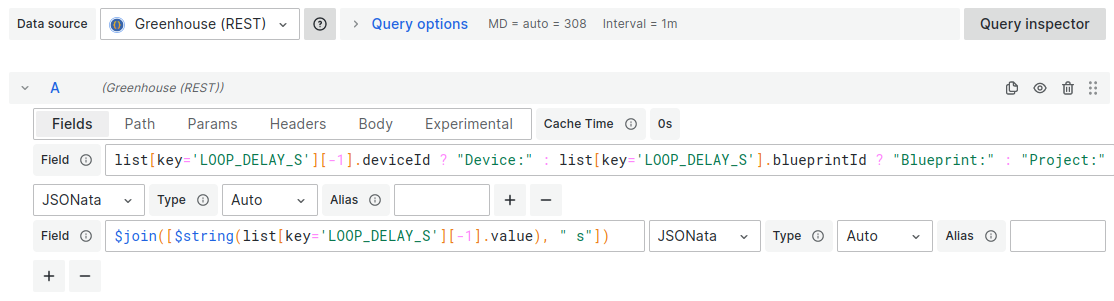
list[key='LOOP_DELAY_S'][-1].deviceId ? "Device:" : list[key='LOOP_DELAY_S'].blueprintId ? "Blueprint:" : "Project:"The code above has a few things going on:
- First, filter all returned values for one key:
list[key='LOOP_DELAY_S']
- Next, get the last value from that list:
[-1]- In our case we know the most specific settings value returned by Golioth will be the last value with that key
- Now let’s do some inline conditional work:
- Inline formatting works as follows:
test ? use_this_if_true : use_this_if_false - Our example returns the string
Deviceif it findsdeviceIdotherwise it tests forblueprintIdand returns the stringBlueprint, or finally defaults to return the stringProjectThe other thing we need is to write the value. But for human-readable values it’s best to return a unit as well. I used JSONata concatenation for this:
- Inline formatting works as follows:
$join([$string(list[key='LOOP_DELAY_S'][-1].value), " s"])This uses the same filtering and negative indexing tricks from above. But there are two new function calls,
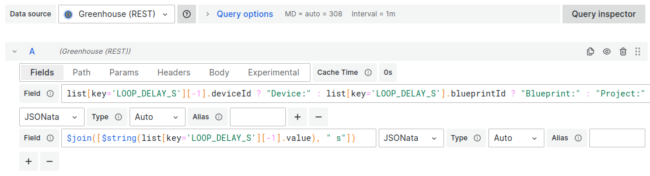
$string() converts the value to a string, and $join() concatenates the two strings together to add a space-S to the value. [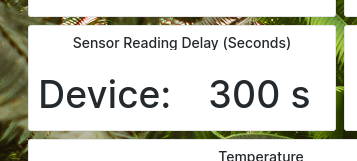 ][5]The panel looks great, and it’s all done with just two field settings in the Grafana: [
 ][6]
][6]
Just a peek at JSONata
This is just a small part of what JSONata has to offer. It has not replaced JSONpath as my go-to parsing language for Grafana, but I find it easier for filtering data, and it has inline conditionals and concatenation that I think are absent in JSONpath. Give it a spin the next time you’re stuck and see if it does the trick! [1]: https://docs.jsonata.org/overview.html [2]: https://blog.golioth.io/wp-content/uploads/2023/03/grafana-select-jsonpath-jsonata.png [3]: https://goessner.net/articles/JsonPath/ [4]: https://blog.golioth.io/what-is-the-golioth-settings-service/ [5]: https://blog.golioth.io/wp-content/uploads/2023/03/JSONata-settings-panel.png [6]: https://blog.golioth.io/wp-content/uploads/2023/03/jsonata-panel-settings.png