How to Debounce Button Inputs in a Real Time Operating System
Golioth ambassador Luis Ubieda explains how to debounce buttons in Zephyr and the tradeoffs between different hardware and software debounce methodology.
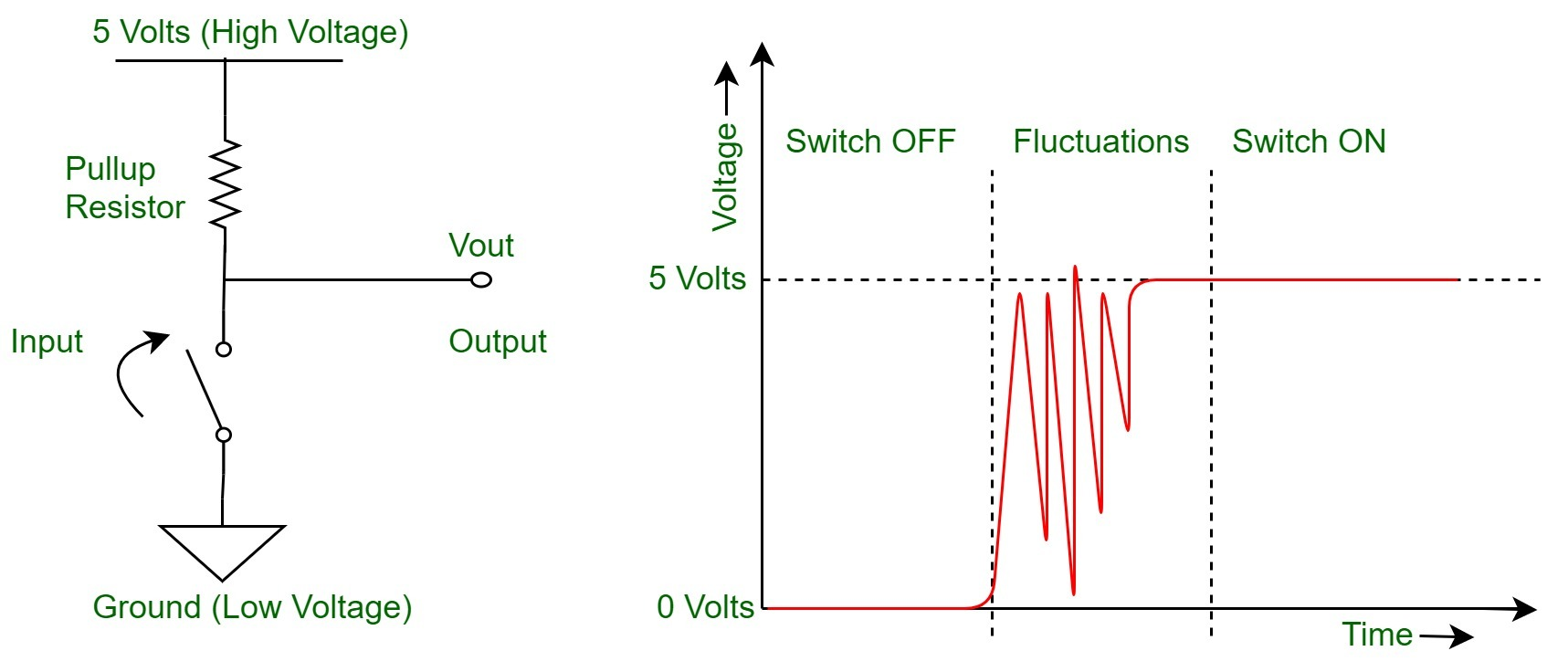
“Wait — a button-press??” Let’s think for a second, how a button press is detected:
- Initial State: a button-press typically consists of a “normally-open switch”, which through a pull-up/down resistor, is normally “high” or normally ‘low’: this is the initial state.
- Press Event: then, when the button is pressed, the switch is closed and the signal transitions towards the opposite state (e.g, low for normally “high” state), and it’s sustained for as long as the button is held by the user.
- Release Event: Finally, when the button is released, it goes back to its initial state.
The Hardware Way
The hardware-way focuses on the root cause: the electrical noise. It guarantees the digital signal won’t have such noise during transitions; and it does it through the use of low-pass filters (most probably RC-filters). There are some pretty cool articles that detail this approach ( see references at the end of the article).
The Software Way
On the other hand, the software-way is about “ignoring” these false positives on the signal transitions to determine which ones are the real events we’re looking for, and which ones aren’t. Even though there are many ways implement software debouncing, there are two main approaches, depending on whether the variable of interest is the signal state or the transitions: periodic sampling and tracking edge interrupts.
A. Periodic Button State Sampling
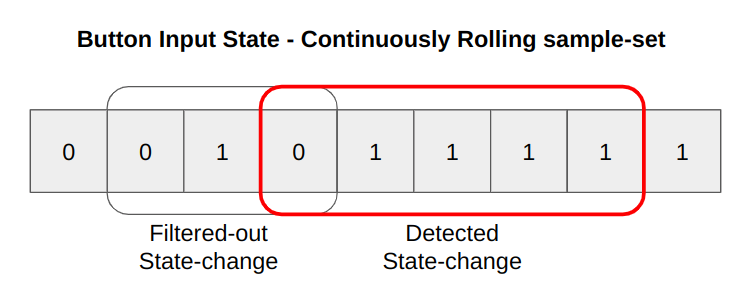
Button sampling works by periodically acquiring the signal state, which is buffered on a continuously rolling sample-set. Through detection of consecutive states, the signal change event is detected (either pressed or released). The rule is simple: if there are X-number of consecutive samples with a changed state, we assume the transition really happened. This periodic sampling is often in the order of 10 to 25-ms and is commonly paced by a hardware timer to guarantee fixed intervals and to free some CPU usage.
B. Tracking Edge-Interrupts with Minimum Cooldown
This works by coordinating the detection of edge changes with the spacing between these: there must be a minimum duration before legitimate signal transition. This cooldown phase is commonly implemented through a timer, which kicks-off on the edge-interrupts: the timer gets restarted on each transition and only when it expires (after 10-ms to 25-ms of no edge-changes), the firmware handles the transition as an event.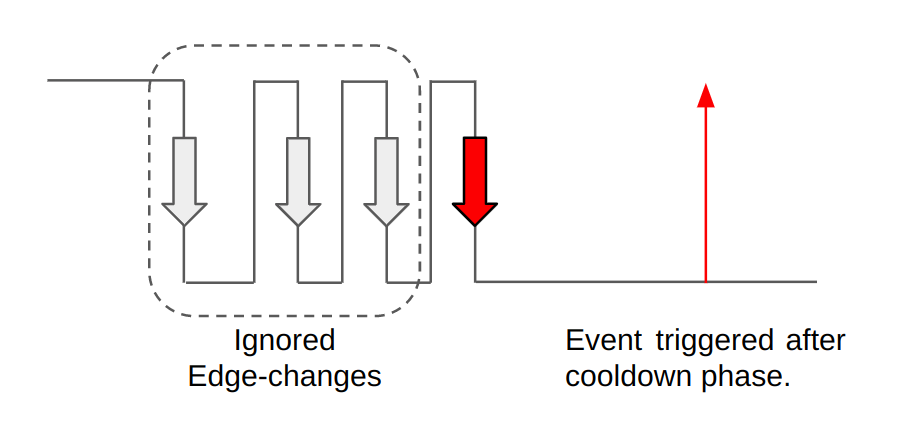
Example Code – Zephyr RTOS
The following code presents an example of achieving the software approach B on Zephyr, with the following observations:
- We’re using Zephyr GPIO interrupt APIs to keep track of the edge-changes.
- We’re using the system workqueue as the cooldown mechanism for false positives.
- Our button-detection module, abstracts both of these details, and only notifies the user of the relevant events: pressed or released.
- Note: the user callback context is the workqueue handler, therefore: actions on this context shall be kept brief to allow proper functioning of other parts of the system.
#ifndef _BUTTON_H_
#define _BUTTON_H_

enum button_evt {
   BUTTON_EVT_PRESSED,
   BUTTON_EVT_RELEASED
};

typedef void (*button_event_handler_t)(enum button_evt evt);

int button_init(button_event_handler_t handler);

#endif /* _BUTTON_H_ */
#includeCheck out the working sample code on#include #include "button.h" #define SW0_NODE DT_ALIAS(sw0) static const struct gpio_dt_spec button = GPIO_DT_SPEC_GET(SW0_NODE, gpios); static struct gpio_callback button_cb_data; static button_event_handler_t user_cb; static void cooldown_expired(struct k_work *work) { ARG_UNUSED(work); int val = gpio_pin_get_dt(&button); enum button_evt evt = val ? BUTTON_EVT_PRESSED : BUTTON_EVT_RELEASED; if (user_cb) { user_cb(evt); } } static K_WORK_DELAYABLE_DEFINE(cooldown_work, cooldown_expired); void button_pressed(const struct device *dev, struct gpio_callback *cb, uint32_t pins) { k_work_reschedule(&cooldown_work, K_MSEC(15)); } int button_init(button_event_handler_t handler) { int err = -1; if (!handler) { return -EINVAL; } user_cb = handler; if (!device_is_ready(button.port)) { return -EIO; } err = gpio_pin_configure_dt(&button, GPIO_INPUT); if (err) { return err; } err = gpio_pin_interrupt_configure_dt(&button, GPIO_INT_EDGE_BOTH); if (err) { return err; } gpio_init_callback(&button_cb_data, button_pressed, BIT(button.pin)); err = gpio_add_callback(button.port, &button_cb_data); if (err) { return err; } return 0; }
https://github.com/ubieda/zephyr_button_debouncing
Conclusion
The most important part of debouncing inputs is to understand how far you should go and which approach best suits you. Cost sensitivity tends to favor software debouncing, whereas less CPU usage favors offloading it to the hardware approach. Like any engineering problem, there are 1000 ways to solve it: always favor the simplest (yet effective) solution that works for you.
References
{#references}